
Meet Setup
The Setup page and the pieces of a meet you set up before race day: meet details, how places are worked out, scoring settings, events, divisions, age groups, teams, waves, and sessions. For a first meet from scratch, start with Getting Started.
The Setup page (Meet Setup)
Open Setup in the meet navigation. The page is called Meet Setup. Change what you need and press Save Changes. It has:
- Meet Details: Name, Genre, Start Date, and End Date. The sport is shown but can’t be changed.
- Venue: the venue’s name and location. Track and field adds Track length, Track shape, Oval lanes, and Straight lanes.
- The meet on other sites: the meet’s id on MileSplit, Athletic.net, RunSignUp, and other sites, and a Started from line when the meet began from a file or link (see below).
- Scoring (road races and cross country): Overall place and Group place for road races, and Scorers, Displacers, Ghost runners, and Team tie-break for cross country.
- Track & Field Setup: Field marks, Seeding profile, and Hip numbers.
- Team Scoring (track and field): Individual points, Relay points, Individual scorers, and Relay squads.
- Display Labels: the Non-binary or other gender label.
- Results Status: Results go official after (see Results and Reports).
- Entry Source: Entries come from, which decides whose athlete IDs the exports write.
- On track and field, a link to Manage sessions and start times….
At the Basic level a track and field meet’s Setup page shows fewer of these (see Getting Started). Road race and cross country Setup is the same at every level.
The meet on other sites, and where the meet started from
The meet on other sites lists the meet’s id on each site that lists it, such as its MileSplit meet id or its RunSignUp race. A meet started from a MileSplit, RunSignUp, or Athletic.net link has that id already. To add one, press Add link, choose the system, and type the ID; edit or remove one from its row. On MileSplit, Athletic.net, and RunSignUp, the id opens the meet’s page on that site. Press Save Changes to keep your changes.
The meet’s RunSignUp id is its RunSignUp race: the meet’s RunSignUp connection pulls from and sends to that race, so changing the id here changes the race the connection uses (see Setting Up Each System).
Below the ids, a Started from line says what the meet was made from, such as “Started from a MileSplit link” with the link, “Started from a RunSignUp participant file”, or the site whose Open Meet Exchange link or file it came from. It can’t be changed. A meet started from scratch has no such line.
The ids travel with the meet in its backup.
Places by gun time or net time (Overall place and Group place)
For road races, Setup → Scoring has two choices, each Gun Time or Net Time:
- Overall place: the order of the overall results.
- Group place: the order within age groups and other award groups.
A new road meet places both by Net Time. Net time counts from each runner’s crossing of the start mat. A race without a start mat, or a runner the mat missed, counts from the gun less any wave delay, so a race with only a finish mat places the same as by gun time.
Some races place overall by gun time and age groups by net time: set Overall place to Gun Time. A USATF championship places by gun time. Cross country and track and field are timed from the gun only.
Genre: what it sets
Each sport has its own genre list. Running offers Road, Trail / Mountain, Obstacle, Ultra, and Other. Cross country offers Scholastic, Open, Championship, Masters, Youth (Recreational, USATF, AAU), and UK / International. Track and field offers Scholastic, Scholastic – Relay meet, Collegiate, UK / International, Open, Championship, Youth (Recreational, USATF, AAU, PAL, Hershey), and Other.
The genre picks starting points: the divisions and events the wizard offers, cross country’s starting team tie-break, and the default report columns, such as grade and team on scholastic meets. Changing the genre later doesn’t rewrite what is already set up.
Events: the fields on an event
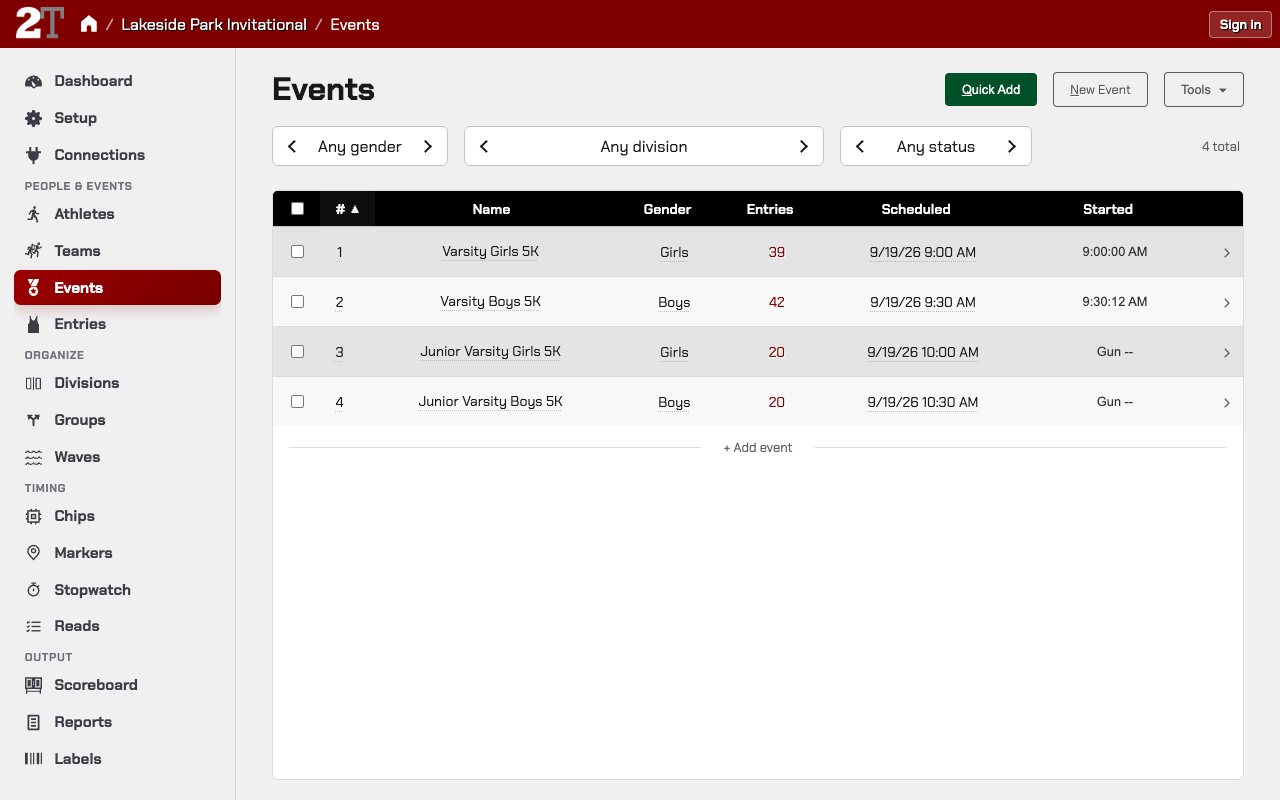
Open Events and open an event. Its form has:
- Event Identity: Event # (keep it matching your Hy-Tek or FinishLynx setup), Division, Gender, and Name.
- Event Type: Discipline and Type for track and field; the race type and distance for road and cross country.
- Round Setup (track and field): rounds, heats, and lanes per heat.
- Timing & Scoring: Scored?, and on track and field Precision.
- Event Links: Part of super-event, to put the event in a combined race.
- Schedule & Notes: Scheduled time and Notes.
Cross country race that isn’t a standard distance (custom distance)
When a new cross country meet’s course isn’t one of the listed distances, such as a 2.9-mile course, set it in the new-meet wizard:
- On the Events step, each division has a Girls and a Boys race with a distance list.
- In the race’s distance list, choose Other — custom distance. It is first in the list.
- Type the distance and choose its Units: Miles (the default), Kilometers, or Meters.
The wizard won’t go on to Review until every race set to Other has a distance. The race is named from its division, gender, and distance. The distance sets the race’s finish window and is what pace on results is worked out from.
Change a race’s distance after the meet is created (off-distance course)
For a road or cross country race whose course came out long or short, such as a “5K” that measured 3.2 miles:
- Open Events and open the race.
- Next to Course distance, press Adjust actual distance.
- Enter the Actual distance and its Units, and save.
The race keeps its name, such as 5K, and pace and reports use the actual distance. Reset to puts it back to the standard distance. Changing the distance doesn’t change an existing finish marker’s window; check it on Markers if the course changed a lot.
Track and field disciplines
On a track and field event, Discipline is the family the event belongs to, not its name:
| Discipline | Includes | Available in |
|---|---|---|
Dash/Run |
Every flat race, sprint through distance (100m–10000m) | All sports |
Hurdles |
All hurdle races | Indoor and outdoor T&F |
Steeplechase |
Steeplechase races | Outdoor T&F only |
Race Walk |
Race walk events | Indoor and outdoor T&F |
Relay |
All relay events (4×100, 4×400, medley, etc.) | Indoor and outdoor T&F |
Horizontal Jump |
Long jump, triple jump | Indoor and outdoor T&F |
Vertical Jump |
High jump, pole vault | Indoor and outdoor T&F |
Throw |
Shot put, discus, javelin, hammer, weight throw | Indoor and outdoor T&F |
Multi-Event |
Decathlon, heptathlon, pentathlon, indoor heptathlon | Indoor and outdoor T&F |
Hurdles, steeplechase, and race walk are their own disciplines, because seeding and results work differently. The discipline decides how results show, how seeding works, and whether wind is recorded.
Add prelims, semifinals, and finals (rounds)
On a track and field event, rounds are on the event form’s Round Setup:
- Open Events and open the event.
- Under Round Setup, press + (Add round) for each round you need.
- Set Heats and Max/Heat (lanes or places per heat) for each round. Field events use Flights and Max/Flt. The number of heats is a starting point; seeding decides the final count.
Adding or removing a round once athletes are entered is covered in Track and Field Setup.
Who advances from one round to the next is set when seeding. See Seeding and Advancement.
Divisions
Divisions group events for reports, seeding, and the schedule. They don’t affect timing. Typical setups:
- Road races: Open Men and Open Women, or one Open division with age groups for awards.
- Cross country: Varsity, Junior Varsity, and so on, each with girls’ and boys’ races.
- Track and field: a division per level or age group, such as Varsity or Middle School.
Create divisions on Divisions, then set each event’s Division. To copy a division with its events, check exactly one division on Divisions, press Clone Division, enter the new name and any labels you want to change, and confirm.
Age groups and award groups
Age groups and other award groups decide who wins awards within an event, such as Women 40–49. Each group’s Basis is Age or Grade, and its type is one of:
- Range: an ordinary age or grade group, such as Women 30–39. It keeps every matching finisher.
- Band: a group whose award winners are taken out of the other groups, such as Women Overall with 3 awards. The three fastest women win Overall and don’t also win their age group.
Athletes are matched to groups by the Age on their athlete record, or by grade. 2Timer doesn’t work out an age from a birth date, so an athlete with no age doesn’t match any age range. Ages come from your import, RunSignUp, a Hy-Tek file, or typing them on Athletes.
Set up and change groups on the Groups page, in the sidebar under Organize. See Groups.
Teams and leagues
- Teams hold each school or club’s team code and name, which drive name display, relays, and team scoring.
- Leagues are optional groupings of teams for conference reports and double duals.
Before race day on a scored meet:
- Turn off Scored? on any team that should stay in the meet but not score.
- Set each team’s Lane Slot if the meet uses team-lane seeding.
- For double duals, use Tools → Generate Double-Dual Leagues on Leagues.
See Teams and Leagues.
Waves: corrals that start after the gun
Waves are start groups that go off after the main gun, such as corrals in a big road race. Each
wave’s Start delay (sec) is in whole seconds: for a wave that starts 3 minutes after the gun,
enter 180. A runner’s wave delay is taken off their gun time for placing, so Wave B isn’t
penalized for starting late.
A wave belongs to the athlete, not the entry: set it in the Wave column on Athletes, on the athlete form, or with a wave column in a spreadsheet import. Delays apply to road races and cross country; on track and field, waves only group athletes.
See Waves.
Sessions (track and field)
Sessions split a track and field meet into blocks of the day, such as “Morning Field Events” and “Afternoon Finals”, and estimate when each event starts. Rounds are put into sessions on the Sessions page, not on the event form. Open it from the meet navigation, or from Setup → Manage sessions and start times…. See Sessions.
Meet setup: checklist
- Sport and genre are right.
- Every event has a unique event number that matches your timing system.
- Track and field events have the right discipline and rounds.
- Divisions exist and events are assigned to them.
- Age groups cover every age you expect, with no gaps, and athletes have ages.
- Waves have the right delays in seconds (multi-wave road races).
- Overall place and group place (gun or chip) match how you’re timing.
- Teams that shouldn’t score have Scored? off.
- Team Lane Slots are set if the meet uses team-lane seeding.
- Leagues are ready for conference or double-dual reports.
Related Pages
- Getting Started
- Importing Data
- Athletes and Entries
- Groups
- Waves
- Teams and Leagues
- Systems and Connections
- Markers and Reads
Metadata
- Last Updated: 2026-10-24
- Document Version: 0.8
- Status: Active