
Seeding and Advancement
Seeding a track and field meet: the Seeding queue and bulk seeding, seeding one event’s heats, lanes, or flights in the workspace, what each seeding rule does, and advancing qualifiers to the next round. Events need the right discipline and rounds, and entries, before seeding.
The Seeding queue
Open Seeding in the meet navigation. The queue lists every event round that can be seeded, with its status. Filter it by event type (All events, Sprints & hurdles, Distance, Relays, Throws, Horizontal jumps, Vertical jumps, Multi-event), by round (Any Round, Finals Only, Prelims Only), by gender, and by division. The filters stay as you move between the queue and the events.
Combined races (super-events) are seeded on the super-event, not on each division’s event, and a multi-event is seeded through its component events.
Seed many events at once (bulk seeding)
On the Seeding queue:
- Seed all eligible (N) seeds every round that can be seeded.
- Seed visible (N) seeds what the current filters show (Standard level).
- Seed selected (N) seeds the rounds you ticked.
- Unseed selected (N) clears the seeding of the rounds you ticked.
Bulk seeding uses each round’s saved seeding rules, or the meet’s seeding profile when a round has none. It replaces the heats and lanes already in those rounds, including any you moved by hand. Rounds with no entries, rounds already started, and completed rounds are skipped, and the result says which and why. Two more are skipped for a round after the first:
- a final already seeded from the results: “Already seeded from the results. Open it to seed again.” Seed it again on its own page, where the changes are named first (see “Seed the next round again after a correction”);
- a round whose round before isn’t complete, such as “Heat 3 of the Prelims has no results yet. Seed the Finals from the results once every heat is in.”
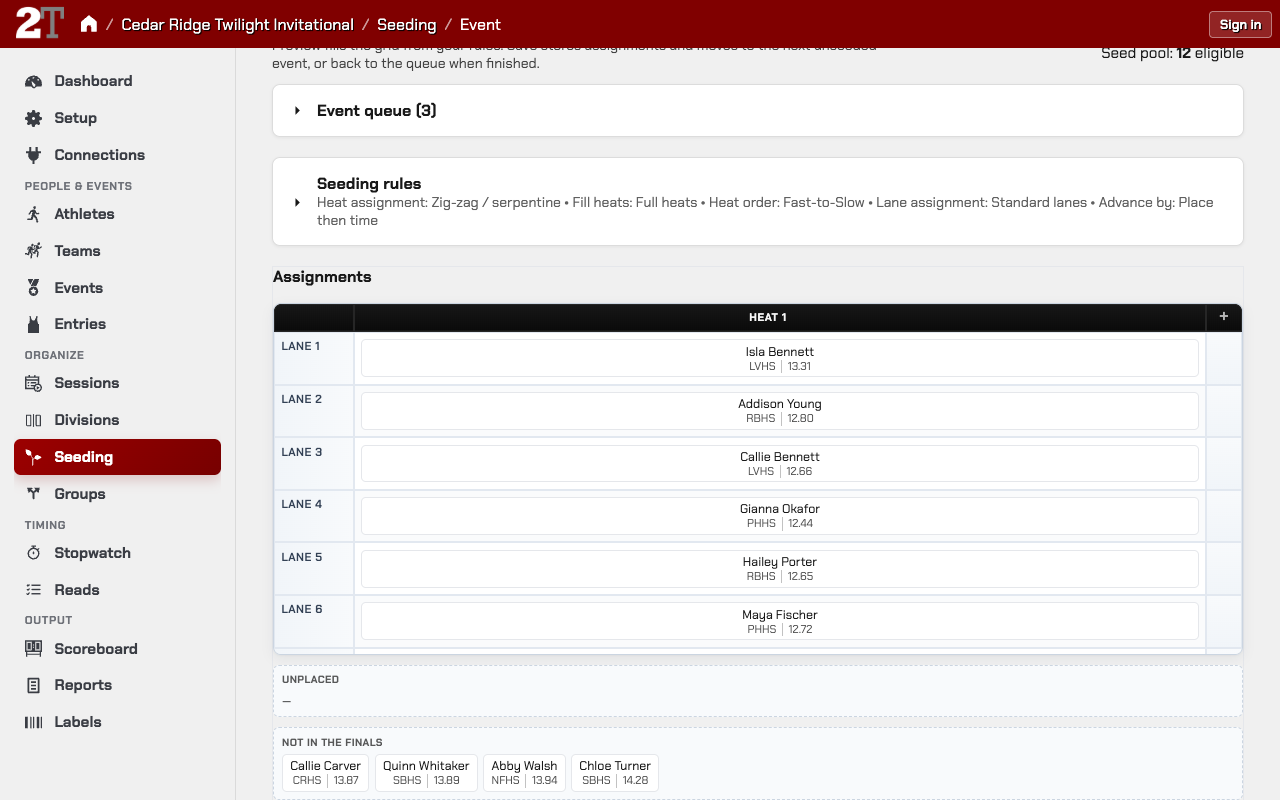
Seed one event (the seeding workspace)
- On the Seeding queue, open the event, or press Seed Manually to start with the first one.
- Check the round, how many athletes are in the pool, and the number of heats or flights and how many per heat.
- Open Seeding rules and adjust them if needed (Standard level).
- Press Seed Round to fill the heat grid with a preview.
- Move athletes in the grid if you need to: drag between heats and lanes, or drop an athlete on Scratched.
- Press Save and Next to save and open the next unseeded event, or Save and Done when it’s the last.
Nothing is written to the entries until you save. Previous, Next, and the Event queue (N) list move between events in the filtered queue.
If 2Timer suggests a different number of heats for the field size, Adjust to N heats applies it. Convert to final-only turns an event with prelims into a final only.
At the Basic level the Seeding rules panel isn’t shown: every rule follows the meet’s seeding profile, so heats are drawn the same way they would be at Standard.
Reseed a round, unseed it, or move athletes by hand
- Re-Seed Round builds a first round’s grid again from the current rules. It replaces any athletes you moved by hand, so make hand moves after the final reseed.
- Unseed clears the round’s heats and lanes.
- To move one athlete, drag them in the grid and save. Seeding the round again rebuilds the grid.
A round after the first works differently: see “Seed the next round from the results”.
Save a round’s seeding rules without seeding it (Save strategy)
In Seeding rules, Save strategy stores the round’s rules (heat and lane rules, and advancement) without writing any heats or lanes. The saved rules are used the next time the round is seeded, alone or in bulk.
Which rules apply to a round:
- the meet’s seeding profile sets the starting rules;
- a round’s saved strategy wins for that round;
- the unsaved changes on screen win until you leave or reseed.
Seed the next round from the results
On a round after the first (the Finals, say), the round before’s athletes are listed beside the
grid under Not in the Finals: the rule’s qualifiers first, marked Q or q, then everyone else
best result first, then results that can’t place (DNF, DQ) under their status. On a phone, tapping
an empty lane offers the same list.
- Wait until every heat of the round before has results. Until then, Preview from the results says which heat is missing, such as “Heat 3 of the Prelims has no results yet.”
- Press Preview from the results. The rule picks the qualifiers and draws their lanes.
- Move athletes if you need to. Placing an athlete the rule didn’t pick asks why (see “Why is Sofia Diaz in the final?”).
- Press Save and Next or Save and Done.
The new entries start empty: the athlete, the event and round, the seed from the earlier result, and the reason. Times, places, splits, notes, and wind stay on the earlier result. A relay’s legs come along without their splits. Only athletes in a lane or under Scratched get entries.
A final entered directly, whose round before has no entries, is drawn from its own entries as before.
Why is Sofia Diaz in the final?
Placing an athlete the rule didn’t pick asks once, in a small dialog (on a phone, in the lane sheet): “Why is Sofia Diaz in the final?”
- Alternate filling an empty lane (preselected): prints no letter. Seeding again keeps Sofia.
- The referee advanced Sofia Diaz (qR).
- The Jury of Appeal advanced Sofia Diaz (qJ).
An athlete advanced by an official gets an extra lane and never takes one of the rule’s spots. A result that can’t place, such as Priya Shah’s DNF, offers only the referee and the jury. Where races aren’t run in lanes, and in field flights, the first choice says spot instead of lane.
When no lane is left for an official’s advance, 2Timer says so before asking: “There’s no lane 9 on this track. To run Priya Shah too, add a heat to the Finals on Round Setup.”
Seed the next round again after a correction
Once the Finals have entries, Preview from the results seeds them again from the results without starting over:
- everyone who stays keeps their heat and lane;
- an athlete the rule no longer picks leaves, and one it now picks joins in the best lane left free;
- alternates, officials’ advances, scratches, and draw winners are kept while their reason still holds;
- Changes names every change before anything is saved, such as “Leaving: Gianna Sprinter (DQ in the Prelims).”
When the save removes anyone, it asks you to type DELETE and the number of entries removed, such
as DELETE 1, before Delete and save works.
Draw lanes again draws the heats and lanes again for exactly the athletes already in the round: nobody joins or leaves, every reason stays, and Changes names each athlete whose heat or lane moves. Nothing is deleted, so nothing is typed. Neither is offered once the round has started.
When the Finals no longer match the results
Until the Finals start, the Seeding page says what no longer matches, under a heading such as “The final no longer matches the prelim results.”:
- “Gianna Sprinter no longer qualifies (DQ).”
- “Maya Chen now qualifies by time and is already in the final as an alternate.”
- “Rosa Sprinter now qualifies but isn’t in the final.”
- “Lane 8 waits for the draw between Maya Chen and Keisha Brown.”
Press Preview from the results in the notice to seed the Finals again. Someone in the round on purpose (an alternate, an official’s advance, a bye) is never named on their own.
Small corrections fix themselves: when a correction to a prelim result makes an athlete in by place qualify by time instead (or the other way), the reason switches, and the letter with it. Nothing switches while a heat of the round before is still being timed.
After the Finals start, nothing changes. Once a Finals heat has a result, corrections to the Prelims no longer move anyone or switch any letter.
A correction that pushes a finalist out
Undoing a DQ on Edit Entry can make the rule pick that athlete in place of someone already in the Finals. Edit Entry asks before saving, with Both run: the Jury of Appeal advanced Gianna Sprinter (qJ) preselected, so the athlete already in the Finals keeps their lane. With no free lane, it says so: “There’s no free lane in the Finals, so Gianna Sprinter and Rosa Sprinter can’t both run. Gianna Sprinter takes Rosa Sprinter’s spot, and Rosa Sprinter leaves the Finals when they’re seeded again.” A correction an import made is asked about in the next Preview from the results.
Seeding rules: what each one does
In the workspace’s Seeding rules panel (Standard level), depending on the event:
- Heat assignment (Flight assignment): which heat or flight each athlete goes in.
- Heat order (Flight order): whether the best athletes go in the first or last heat.
- Fill heats (Fill flights): full heats first, or balanced.
- # of heats and Per heat.
- Start type: lanes, alleys, or waterfall.
- Lane assignment (or Position order for waterfalls and field events): where athletes go within a heat.
- Split teammates across heats when possible (not for field events).
- Advancement from the round before (Advancement from Prelims, or Advancement from Qualifying in a long jump): Advance By and Tie Policy.
Heat assignment: circle, zig-zag, best together, and the rest
Heat assignment decides which heat, section, or flight each athlete goes into:
- Circle: seeds go straight down the heats and repeat. With three heats, seed 1 to Heat 1, 2 to Heat 2, 3 to Heat 3, 4 back to Heat 1 (Heat 1 gets 1, 4, 7, 10…).
- Zig-zag / serpentine: seeds go down the heats, then back up, spreading the best athletes as evenly as possible (Heat 1 gets 1, 6, 7, 12… with three heats). A common choice for prelims.
- Best Together: the best athletes are packed into fewer heats, such as a fast final section.
- Left-to-Right by Two: seeds are placed in pairs into each heat in turn.
- Alpha by Last Name: heats by last name, ignoring seed (team name when there’s no last name).
- Alpha by Team: heats by team name, ignoring seed.
- At random: athletes are shuffled before heats are filled.
Heat order: fastest heat first or last
Heat order (Flight order for field events) matters for seed-ranked heat assignment: circle, zig-zag, best together, and left-to-right by two.
- Fast-to-Slow: the best athletes are in Heat 1.
- Slow-to-Fast: the best athletes are in the last heat.
It changes heat numbers, not the schedule. Alphabetical and random assignment ignore it.
Full or balanced heats
Fill heats (Fill flights) decides how heats are sized:
- Full heats: fill each heat before starting the next; the last can be small (17 athletes, 8 per heat: 8, 8, 1).
- Balanced heats: spread athletes evenly (17 athletes: 6, 6, 5).
- Fill, balance last two: fill heats, then even out the last two (17 athletes: 8, 5, 4).
Start type: lanes, alleys, or waterfall
Start type describes the start for running events (field events don’t use it):
- Lanes: each athlete has their own lane, for sprints, hurdles, and relays.
- Alleys (Shared Lane): several athletes share a lane area, as in some 800m formats.
- Waterfall: athletes start on a curved line, for longer races.
Waterfall starts: single or double
With Start type set to Waterfall, Waterfall layout is:
- Single Waterfall: everyone starts on one curved line.
- Double Waterfall: two lines. Top seeds start on chooses the Outside waterfall line (the NCAA default) or the Inside waterfall line, and Inside line size sets how much of the section starts on the inside line: 33% (the NCAA default), 25%, 40%, or 50%. Each choice shows about how many athletes that is.
Lane assignment: where athletes go in the heat
Lane assignment (Position order for waterfalls and field events) places athletes within each heat after heats are filled:
- Standard lanes: the best seeds get the meet’s preferred lanes, usually center lanes first.
- Lanes Ascending: best seed in lane 1, then 2, 3, and so on.
- Lanes Descending: best seed in the highest lane, then down.
- For waterfalls and alleys: Inside → Outside or Outside → Inside.
- Random: lanes are shuffled within each heat.
- Team lane seeding: lanes come from a team lane template (see Team-Lane Seeding).
- Advanced lane seeding…: a special lane order and draw (see “Preferred lane order and lane draws”).
For field events, positions run 1, 2, 3 by seed.
Preferred lane order and lane draws (conference meets)
When a conference or facility publishes a special lane order, choose Advanced lane seeding… in Lane assignment on a lane-start running event:
- Preferred lane order: Use meet default, Outside lanes first, Paired lane draw, or
Custom…, where you type the published sequence, such as
5, 6, 4, 7, 3, 8, 2, 9, 1. A partial sequence is fine: the rest of the lanes follow in the usual order. - Draw: Seeded order, Random draw within groups, or Seeded within groups.
- Draw groups: such as Top 4, then remaining lanes or Top 2, next 2, then remaining lanes.
The preview and the saved heats use the same draw, so a reviewed layout doesn’t change when you save it. A seeding profile can set preferred lanes for a whole group of events (see Seeding Profiles and Defaults).
Keep teammates out of the same heat
Split teammates across heats when possible tries to keep athletes from the same team in different heats after heats are filled. It’s a best effort, not a guarantee, and isn’t offered for field events or with team lane seeding.
Advance qualifiers to the next round (who makes the final)
On a round after round 1, Advancement from the round before (Advancement from Prelims, say) in Seeding rules decides who moves up from that round. Advance By:
- Place then time: the top places from each heat, then the next fastest. The most common prelim format.
- Winner then time: each heat winner, then the next fastest.
- Top 2 then time: the top two in each heat, then the next fastest.
- Place only: places in each heat only.
- Time only: the fastest overall, whatever the heat.
- Custom: set Custom place advancers / heat and Custom time advancers yourself.
For field events, “time” means mark (Custom mark advancers, per flight). Built-in field rules advance by Mark only. At the Basic level, advancement follows the seeding profile.
Per-heat counts come from the heats as seeded. Place then time sends at least one per heat; Place only sends the same number from every heat, as many as fit (4 heats into 8 lanes: 2 each), and leaves the rest empty. Byes take their spots first, and athletes advanced by an official are left out of the ranking.
When a rule sends more athletes than the next round holds, the panel says so with a fix: “Top 2 then time sends 10 from 5 heats into 8 lanes. Add a heat to the Finals, or choose Winner then time.”
Q, q, and the other letters on a prelim result
2Timer prints the qualifier letter after a prelim result itself, from why that athlete is in the next round. You never type it.
| Letter | Means |
|---|---|
Q |
Qualified by place |
q |
Qualified by time (by mark in a field event) |
qD |
Won a draw for the last spot |
qR |
Advanced by the referee |
qJ |
Advanced by the Jury of Appeal |
| none | In the next round as an alternate, or not in it at all |
Seeding the final from the results records each finalist as By place or By time. Gianna wins
her heat, so her prelim prints 12.44 Q; Maya is in on time and prints 12.58 q. Field events
print q for every qualifier. The letter shows on the results sheet, on the Entries screen, and
on live results, before any flags you typed: 12.44 Q MR.
A result that can’t place, such as a DNF or a DQ, prints no Q or q, but still prints qR or
qJ: Priya falls, the referee advances her, and her prelim prints DNF qR.
To say why someone you placed by hand is in the final, open their final entry. Edit Entry asks “Why is Sofia Diaz in the final?” with Alternate filling an empty lane, The referee advanced Sofia Diaz (qR), and The Jury of Appeal advanced Sofia Diaz (qJ). A reason the rule gave (By place, By time) is shown as a line instead: seed the final again from the results to change it. On the prelim entry, Edit Entry shows a line such as “Qualified by place for the Finals (Q)”.
In a long jump, triple jump, or throw, the first of two rounds is called Qualifying and the second Final, because “prelims” already means attempts 1–3 there.
Ties at the qualifying cutoff (Tie Policy)
Tie Policy decides what happens when athletes tie for the last qualifying spot, by place or by time, counted across all heats together:
- Advance all: everyone tied at the cut advances when there’s room: an empty lane in the round, then a spare lane on the track, then another heat. A field flight, and a race not run in lanes, always has room. When there isn’t room, you say who won the draw.
- Advance none: nobody tied at the cut advances; their spots stay empty for you to fill.
Every built-in seeding rule uses Advance all. A meet saved before this update with Advance none was switched to Advance all when it opened; set it back on the Seeding rules panel if you meant it. Your own seeding profiles in Settings → Seeding switched the same way, because duplicating a built-in profile copied its old Advance none; set Tie Policy back on the profile if you meant it, and it stays.
In a long jump, triple jump, or throw, a tie at the cut is broken by the next-best mark only when the meet says so: Jump and throw ties at the cut on the meet’s page (Standard level). NFHS, NCAA, and NAIA don’t count back; USATF does.
Draws for the last spot
When a tie under Advance all has no room, the lane it would take waits for the draw. Before saving, 2Timer asks: “Maya Chen and Keisha Brown tie at 12.58 for the last lane in the Finals, and there’s no lane 9 on this track. Who won the draw?”
- Maya Chen won the draw: enters as Drawing lots and prints
qD. - A run-off decided it: then who won it; the winner enters By time (or By place) and
prints
q(orQ). - Not drawn yet: saves the round with the lane empty.
Dragging one of the tied athletes into the waiting lane asks the same question for that athlete. Anyone else is refused: “Lane 8 waits for the draw between Maya Chen and Keisha Brown. Put the winner there first.” If the draw went the other way, open the Drawing lots entry and change its athlete to the other tied athlete: Edit Entry asks the draw question again.
Adding, deleting, moving, and changing entries in a later round
- Add Entry or Quick Add to the Finals: an athlete the rule qualifies is recorded By place or By time with no question. An athlete with a Prelims result the rule didn’t pick is asked why, as on the grid. An athlete with no Prelims entry is a bye, after “Jordan Miles has no Prelims entry. Add Jordan Miles straight to the Finals as a bye?” A bye prints no letter, is kept when the Finals are seeded again, and is never named in the notice.
- Deleting a Prelims entry of an athlete in the Finals says so beside the typed
DELETE: “Maya Chen is in the Finals. The Finals entry stays but will no longer have a Prelims result.” With more than one: “2 of these athletes are in the Finals. Those Finals entries stay.” - Moving: a Finals entry can’t be moved or copied to another event, and a Prelims entry can’t be moved while the athlete is in the Finals. Transfer says why, such as “Maya Chen is in the 100 m Finals. Remove Maya Chen from the Finals first.”
- Changing who a Finals entry belongs to (Change Athlete, the bib dialog, a relay’s team code or letter) says so first: “This final entry is Maya Chen’s. Changing it to Sofia Diaz takes Maya Chen out of the final.” Then it asks why Sofia is in the final, or confirms a bye. A new bib for the same athlete changes nothing.
- Fixing who is who inside the Finals keeps each athlete’s reason: Swap identities trades the reasons with the athletes, Give this finish to the bib athlete moves the reason with the athlete, and Merge into the existing entry keeps the existing entry’s reason. None of these asks.
Common seeding setups
- Prelims: Zig-zag / serpentine, Slow-to-Fast, Balanced heats, Standard lanes, and Place then time.
- A fast final section: Best Together, Slow-to-Fast, and Standard lanes (or Inside → Outside for waterfall and alley starts).
- A published conference lane order: Advanced lane seeding… with Outside lanes first or Custom…, and the conference’s draw.
Heats per round and lanes per heat (defaults)
When a round’s Per heat (or flight size) is left at 0, it uses a default: the meet’s lane counts on Setup, or the seeding profile’s default for distance and field events, or a built-in fallback. The workspace says which one it’s using.
Field event flights
Field events use the same queue and workspace, with flights and positions instead of heats and lanes. Check the number of flights, positions per flight, the order, and whether seed marks or the prior round are being used.
Hip numbers, team lanes, and scoring heats after seeding
- Hip numbers are written when heats are saved, following the meet’s Hip numbers setting (see Hip Numbering).
- Team lane seeding needs a team lane template and teams’ lane slots (see Team-Lane Seeding).
- Finals scoring heats show in the workspace, but are set on the event’s Round Setup (see Track and Field Team Scoring).
A round can’t be seeded
Seeding is blocked when a round has no entries, has started, has results, or is completed. Then use Entries to make changes instead of reseeding.
Seeding: common problems
- Nothing bulk seeds: the rounds have no entries, or have already started.
- The wrong athletes are in round 2: the prior round’s results aren’t final, or the advancement rule is wrong. Fix the results, then press Preview from the results to seed it again.
- Preview from the results is refused: a heat of the round before has no results yet; the message names it.
- The heat size looks wrong: the round is using a meet default or fallback; set Per heat on the round.
- Hand moves disappeared: the round was reseeded or bulk seeded afterwards.
- An event isn’t in the queue: it’s filtered out, it’s a division of a combined race (seed the super-event), or it’s a multi-event parent (seed its components).
Seeding: checklist
- Entries are in before seeding.
- The right round is selected.
- Queue filters show the events you mean.
- Preferred lanes and draws match the meet’s published procedure.
- The preview looks right before saving.
- Prior-round results are final before advancing.
- Lane slots are set before team lane seeding.
- Rounds that have started aren’t reseeded.
Related Pages
- Track and Field
- Track and Field Setup
- Seeding Profiles and Defaults
- Team-Lane Seeding
- Hip Numbering
- Teams and Leagues
- Athletes and Entries
- Results and Reports
Metadata
- Last Updated: 2026-10-21
- Document Version: 0.7
- Status: Active